

Multiroom
Enjoy Fetch in more rooms.
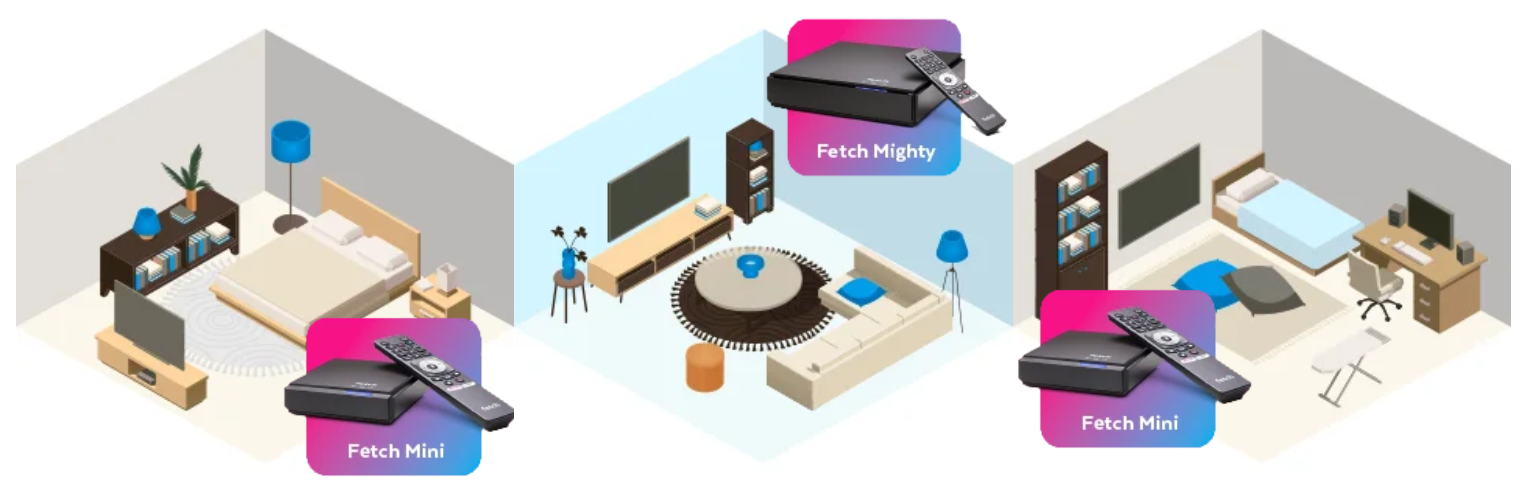
At $4.49/month, Multiroom enables you to watch Fetch on different TVs in different rooms, all at the same time. This way, you can continue to use your Gen 3 device(s) for other TVs in the home, if you already have or purchase a second device.
Learn more about the options for your additional device here.
Your Multiroom benefits:
- Watch Fetch in more rooms. With up to 3 devices under 1 Fetch account, everyone at home can watch what they want, where they want. Keep the whole household happy.
- Stream live TV without extra setup. Catch live TV and free-to-air channels over the internet with no need for more hardware or rooftop antennas.
- Share everything you love across devices. Access the same movies, TV shows, content packs and recordings on every Fetch device so your entertainment follows you around the home.
Get extra devices
Purchase the Fetch Mini Gen 5 as an additional access device in your home. Link up your new Fetch device with your existing Gen 3 device for the perfect Multiroom setup.
When purchasing a new device and setting it up with Multiroom, both the Fetch Access subscription ($4.99/month) and Multiroom fee ($4.49/month) will apply. These subscription are charged per Fetch account, not per device.
Learn more about your device upgrade options, including the improved technical specs and included apps & features here.
As a long-time user of the Fetch Gen 3, you are eligible for our Loyalty Offer to save when you upgrade.
*Note: When setting up Multiroom, Retail Fetch devices cannot be mixed with devices from broadband providers.

Step 2
Under "Account Settings", select "Add & Remove Fetch Box".
Step 3
Click "Get Activation Code / Fetch ID" and follow the prompts.
Need more help? Check out our Multiroom user guide.
If you got Fetch from an ISP Partner, please contact your phone or internet provider for further details on their Multiroom offering and how to set it up.
1. Sign into your account at fetchtv.com.au/manage/login.
2. Under "Account Settings", select "Add & Remove Fetch Box".
3. Click "Get Activation Code / Fetch ID" and follow the prompts.
Need more help? Check out our Multiroom user guide.
If you have a Mighty connected to a Free-to-Air aerial, you can access FTA TV on other boxes that do not have an aerial connection.
Once Fetch boxes are connected, you will be able to share the following:
- Recordings: Set a recording on your Fetch Mighty to watch back on a Fetch Mini or Mighty in another room in the house.
- Channel Pack subscriptions: If you are subscribed to one or more Channel Packs, you can watch those channels on a second or third box in another room for no additional cost.
- Movie Store rentals and purchases. Renting a movie on one box, means you can watch it on any connected box. You will only pay the fee to buy or rent it once.
- TV Store purchases: Like the Movie Store, if you buy a TV Show on one box, you can watch it on other connected boxes for no additional fee.
- Free-to-Air via aerial: If you have a Mighty connected to a Free-to-Air aerial you can access and record Free-to-Air TV on other Mini boxes that do not have an aerial connection.
- You can continue watching your recordings, movies or shows from the Store, and programs on TV Apps on a connected box. You can turn this feature on or off on your Fetch box through the Multiroom settings at Menu > Settings > Multiroom.
You can have up to 3 Fetch devices on one account. Multiroom requires that all devices come from the same sources, and are on the same account and network.